
📅 Release date:
Overview
Share feedback
Help shape the future of ggLeap by contributing to our roadmap. Share your ideas and vote on features here: https://pipeline.ggleap.com/
How to update
If you are a managed ggCircuit customer and we update your ggRock image, then you should request an update in your dedicated support channel.
Otherwise you can update any client pc(s) here https://admin.ggleap.com/settings/client/version
New features
Combo Deals
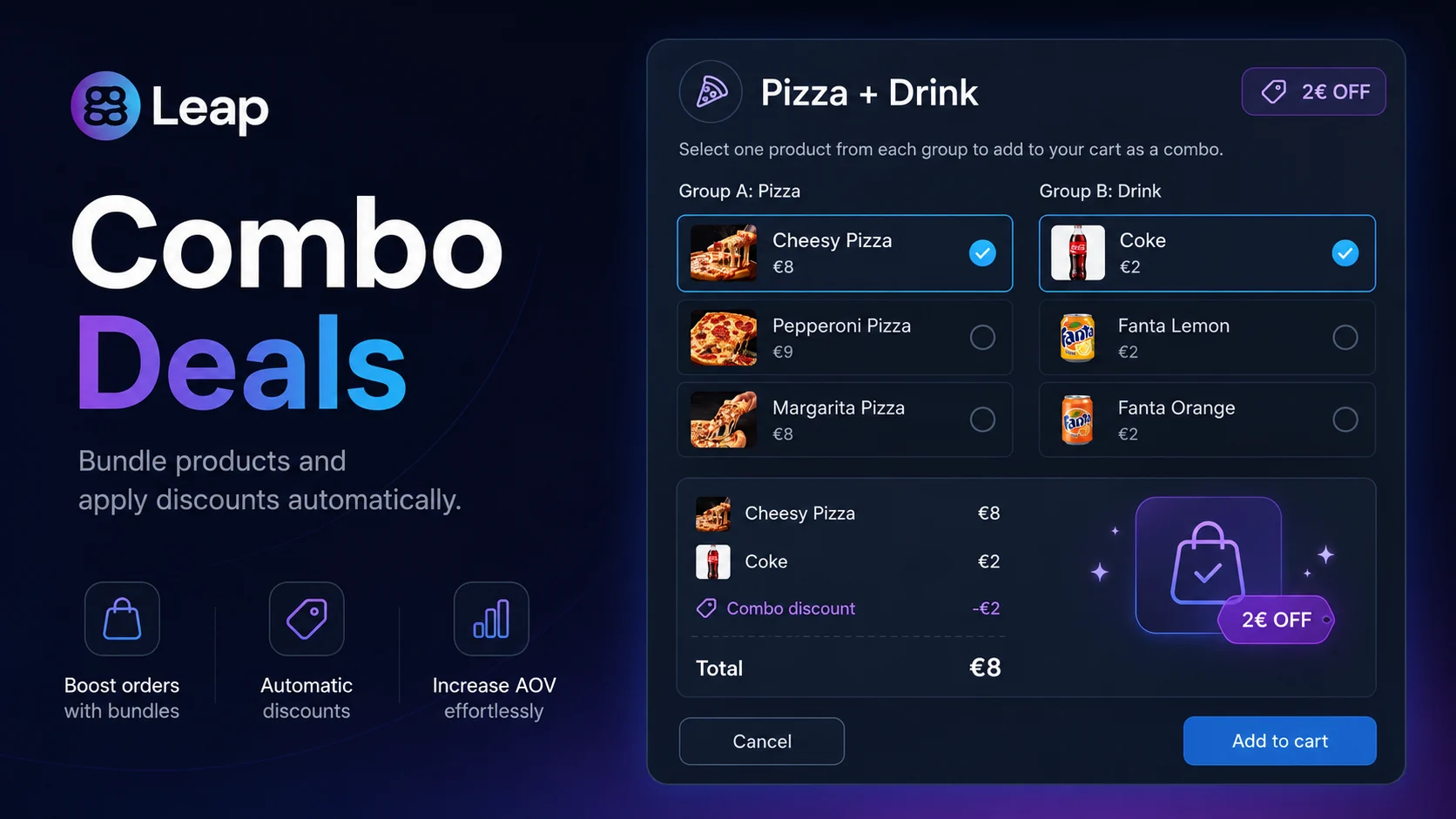
We are introducing Combo Deals, a brand-new way to bundle products in the ggLeap shop. Instead of creating every possible combination of products manually, center admins can now define a single rule with the participating products and a discount — and ggLeap will automatically apply the discount whenever those products end up together in the cart.
How it works
From Web Admin → Shop, admins create a Combo Deal by picking 2 or more products and setting either a fixed price or a percentage discount.
When a customer (or a staff member at the POS) adds those products to the cart, ggLeap automatically detects the combination and applies the discount — no manual lookup, no separate SKU per bundle.
Combos work across regular orders, post-pay, and prize redemptions, and a clear "already in combo" badge appears on items so it's always obvious where the discount comes from.
Benefits
Massive setup simplification: one Combo Deal replaces dozens of individually-priced package combinations.
Higher average ticket: customers see the discount appear in real time, encouraging them to add the matching product.
Cleaner catalog: no need to clutter your shop with duplicated bundle products just to support a discount.
Stock-aware: combos respect stock, post-pay rules, and guest-vs-member pricing the same way single products do.
Counter-Strike 2 in the Arcade
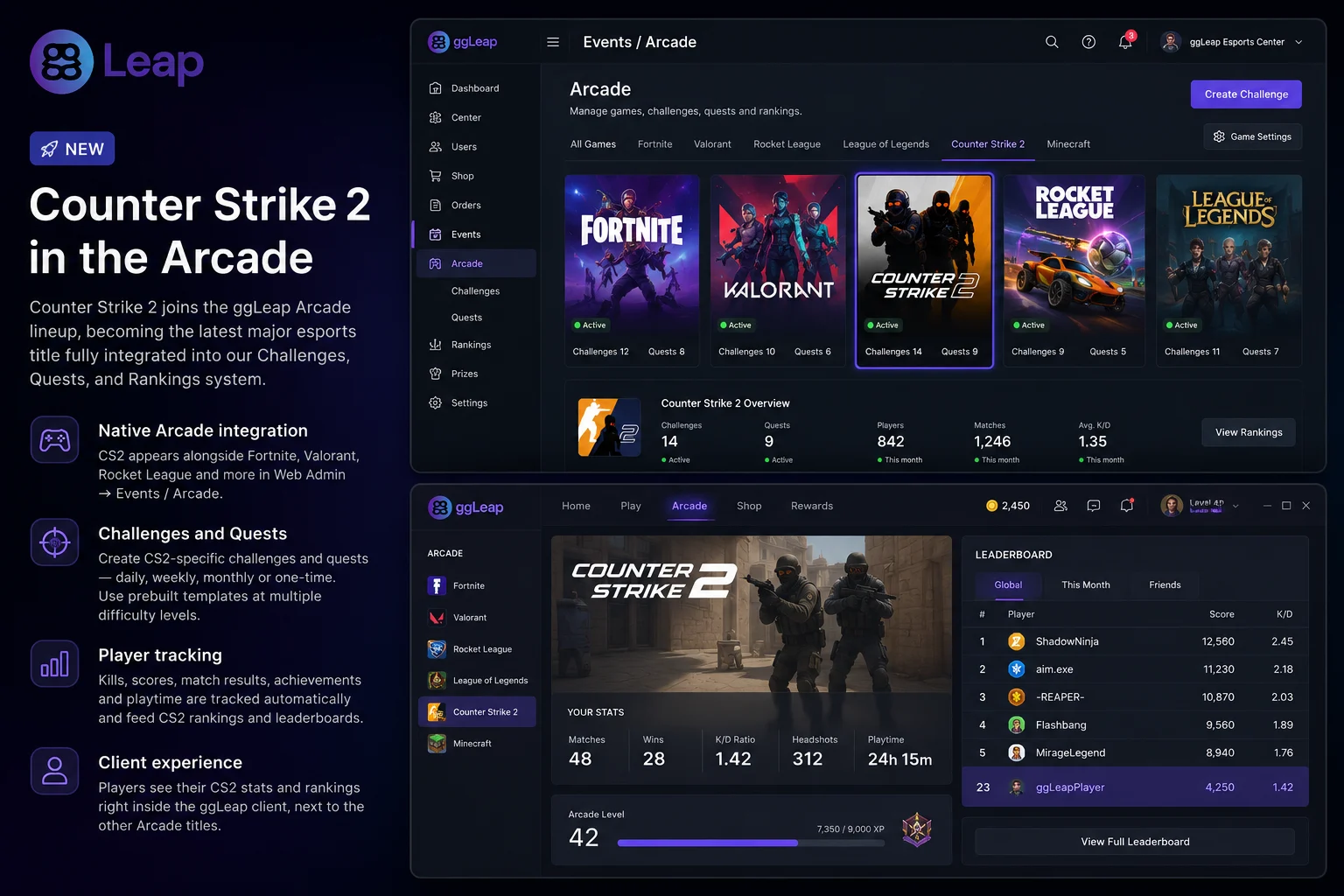
Counter-Strike 2 joins the ggLeap Arcade lineup, becoming the latest major esports title fully integrated into our Challenges, Quests, and Rankings system.
What you get
Native Arcade integration: CS2 appears alongside Fortnite, Valorant, Rocket League and the rest of the supported titles, with its own tab in Web Admin → Events.
Challenges and Quests: center staff can build CS2-specific challenges and quests — daily, weekly, monthly or one-time — and repeat them as often as needed. Prebuilt templates are available at multiple difficulty levels to get started in seconds.
Player tracking: kills, scores, match results, achievements and playtime are tracked automatically and feed CS2 rankings and leaderboards.
Client experience: players see their CS2 stats and rankings right inside the ggLeap client, next to the other Arcade titles.
This expands the competitive offering of every center using ggLeap Arcade and gives CS2 communities a first-class home alongside the rest of the ecosystem.
Auto-lock / Auto-delete Inactive User Accounts
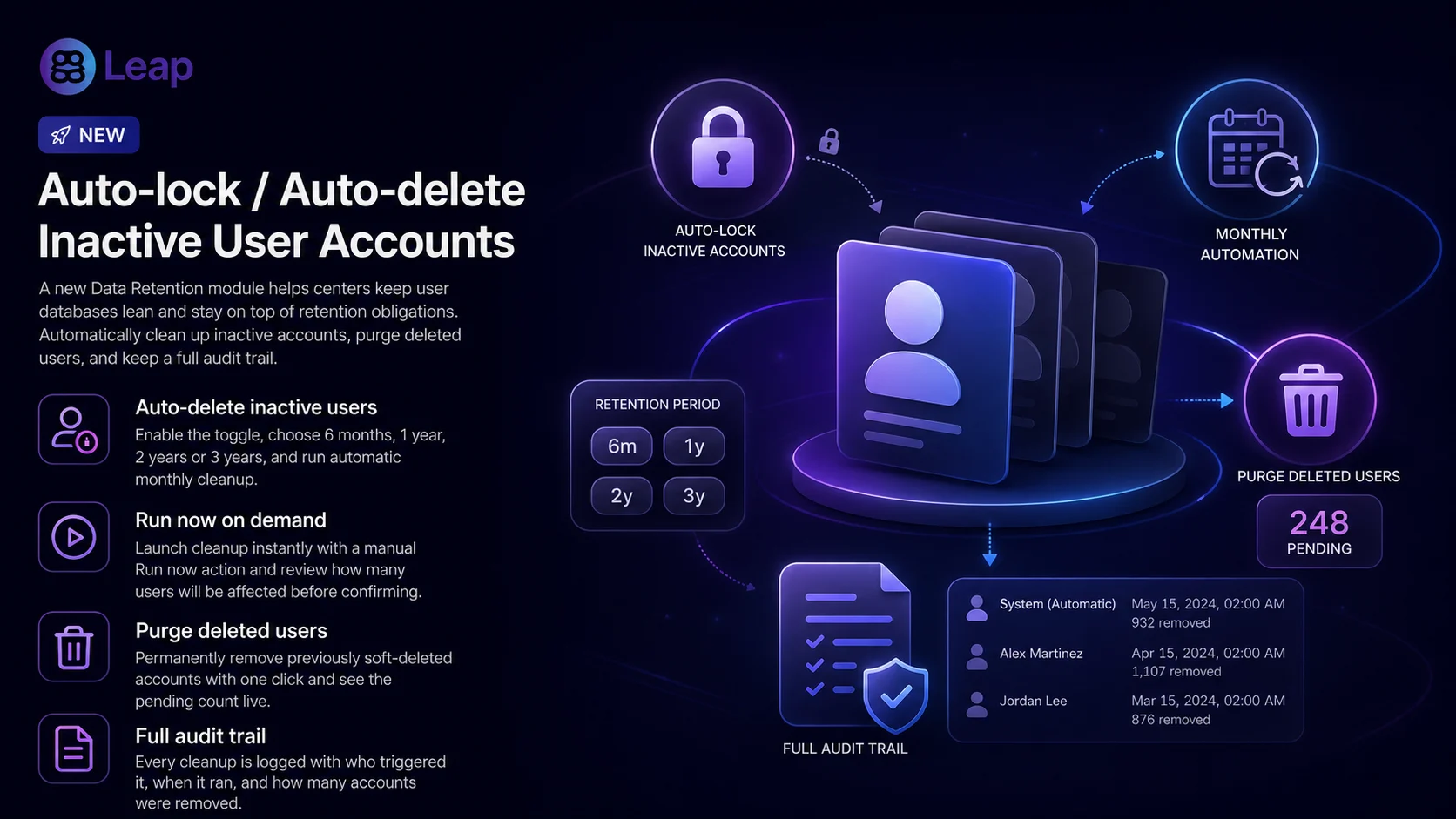
Centers that handle large rotating user bases — universities, schools, esports academies — have been asking for a clean way to keep their database lean and stay on top of data-retention requirements. With this release we are introducing a full Data Retention module in Web Admin.
How it works
A new Settings → Users → Data retention page centralizes everything related to permanently removing user accounts.
Auto-delete inactive users: enable the toggle, pick a retention window (6 months / 1 year / 2 years / 3 years) based on the user's last sign-in, and ggLeap runs the cleanup automatically once a month. A "Run now" button is available for on-demand cleanup.
Purge deleted users: a one-click action to permanently remove accounts that were previously marked as deleted, with a live count of how many are pending.
Both actions show the number of users that will be affected before you confirm, and every run is recorded in the activity log (who triggered it, when, and how many accounts were removed).
Benefits
Faster user search and listings for centers with thousands of historical accounts.
Smaller database footprint and less data-retention exposure.
Safer by default: off until a center explicitly enables it, with clear confirmation steps and full audit trail.
We also reorganized the Settings > Users area: User details configuration and Player notifications now live under a single, dedicated Users section, accessible from a new gear icon on the Users page.
Other updates
Web Admin
Launcher chaining: new Web Admin setting to automatically launch an extra program right after a game launcher opens, plus a new option to start a specific app after a launcher — useful for centers that run tracking tools, anti-cheat software, or other utilities alongside their game launchers, anti-cheat or custom helpers.
Stripe Checkout improvements: optional collection of Full Name and Billing Address in Stripe Checkout for centers that require complete invoice data.
Guest controls: added Force guest logout action, and the "Login guest" menu item is now correctly hidden when guest access is disabled in settings.
Activity tracking: activity log now records when an event is enabled or disabled.
Receipt page: the Deliver button is back on the receipt page for faster post-pay fulfillment.
X.com domain: the social link validator now accepts
x.comURLs in addition totwitter.com.Cash balance polish: minor adjustments and consistency fixes on top of the cash balance feature shipped previously (post-pay handling, "add money to balance" visibility, duplicated balance amount via Stripe Checkout).
Reworked Orders Page polish: small refinements following the orders rework released earlier — including coin amounts now displaying with your region's number formatting, prevented negative numbers from being entered in filter fields, and clearer cursor and expand/collapse behavior on column headers.
Bug fixes
Shop & Commerce
Coupon code discounts now apply correctly at checkout.
Fixed an issue loading product categories in some shop setups.
Resolved an issue where orders for prizes were being created as post-pay even when the user's balance was below the required amount.
Post-pay orders are now correctly delivered first before they can be paid.
Fixed an issue where an order could disappear from the "Action required" list before being completed.
Refund window now shows a scrollbar when there are many items.
Fixed an issue where deleting a Product or Offer could sometimes fail.
Fixed a case where a payment or offer record could go missing during checkout.
Payments & Subscriptions
Gamepasses now reliably award after a successful Stripe payment.
Subscription change emails are now sent to the center owner and every user with permission to manage subscriptions.
Bookings
The 'Currently active' notification no longer appears in the new booking window before the booking is actually created.
Booking time panel now matches the value shown on the page.
Sessions, Login & Auth
Tightened sign-in rules so the same account can't be signed in on multiple devices at once.
Fixed a crash that could occur when creating employee accounts.
Your session now renews automatically in the background, so you won't be unexpectedly signed out.
Statistics & Reporting
Fixed games showing up without a name in the per-player stats table.
Fixed an issue that was preventing some daily report emails from being sent.
Corrected broken images in Daily Report emails.
Activity Logs
Fixed bug where the logout duration is reported as
0.
Client & Marketplace
Remote desktop requests are no longer made when the remote desktop add-on is not active
Users no longer get logged out when purchasing certain offers.
Fixed an issue that causes the launcher to be terminated instantly when the process closes, even if the game is about to restart.
Need help? If you have any issues with any feature in this release, please come to Discord or use webchat support so we can investigate.